पोर्टफोलियो टीयूआई
यह पोर्टफोलियो एक टर्मिनल ऐप के रूप में है जिसे आप SSH के माध्यम से खोल सकते हैं।
इस लेख का अंग्रेजी से मशीन द्वारा अनुवाद किया गया है। मूल लेख पढ़ें
- कमिट
- 44
- पिछले एक साल
- सितारे
- 0
- भाषा
- Go
- आखिरी प्रयास
- जुल॰ 2026
इस पृष्ठ पर
यह क्या है#
यह पोर्टफोलियो का टर्मिनल संस्करण है। यह स्थानीय रूप से फुल-स्क्रीन TUI के रूप में चलता है, या एक सेल्फ-होस्टेबल SSH सर्वर के रूप में चलता है जिसे आगंतुक सामान्य ssh कमांड से एक्सेस कर सकते हैं । दोनों ही तरीकों से आप vim-शैली की कुंजियों का उपयोग करके प्रोजेक्ट, पोस्ट, कौशल और अनुभव ब्राउज़ कर सकते हैं। ब्लॉग पोस्ट पोर्टेबल टेक्स्ट से प्रदर्शित होते हैं, जिसमें विषय-सूची भी शामिल होती है t
ढेर#
बबल टी, बबल्स और लिप ग्लॉस के साथ आगे बढ़ें और SSH सर्वर के लिए विश का उपयोग करें। यह साइट की तरह ही Sanity कंटेंट पढ़ता है, इसलिए संपादन के लिए एक ही जगह है, और Sanity अनुपलब्ध होने पर यह अंतर्निहित कंटेंट पर वापस आ जाता है। एक डॉकर इमेज सेल्फ-होस्टेड GitHub एक्शन रनर पर बनाई गई है, और सर्वर पहली बार शुरू होने पर अपनी होस्ट कुंजी स्वयं जनरेट करता है।
कठिन भाग#
विस्तृत टेक्स्ट को एक निश्चित ग्रिड में फिट करना। पैराग्राफ, सूचियाँ और कोड ब्लॉक बॉर्डर वाले पैनल के अंदर क्लाइंट के टर्मिनल द्वारा बताई गई चौड़ाई के अनुसार रैप होने चाहिए, और सूचियाँ खोजयोग्य बनी रहनी चाहिए। छोटे टर्मिनलों पर एक पंक्ति बचाने के लिए, ब्रेडक्रम्ब्स को अलग पंक्ति लेने के बजाय पैनल बॉर्डर में ही बनाया जाता है।
स्थिति#
बनाए रखा।
README.md
MeAshikeqbal/portfolio-tui · main
A terminal-native portfolio built with Go, Bubble Tea, Bubbles, and Lip Gloss. It can run locally as a full-screen TUI or as an SSH-accessible portfolio server powered by Wish.
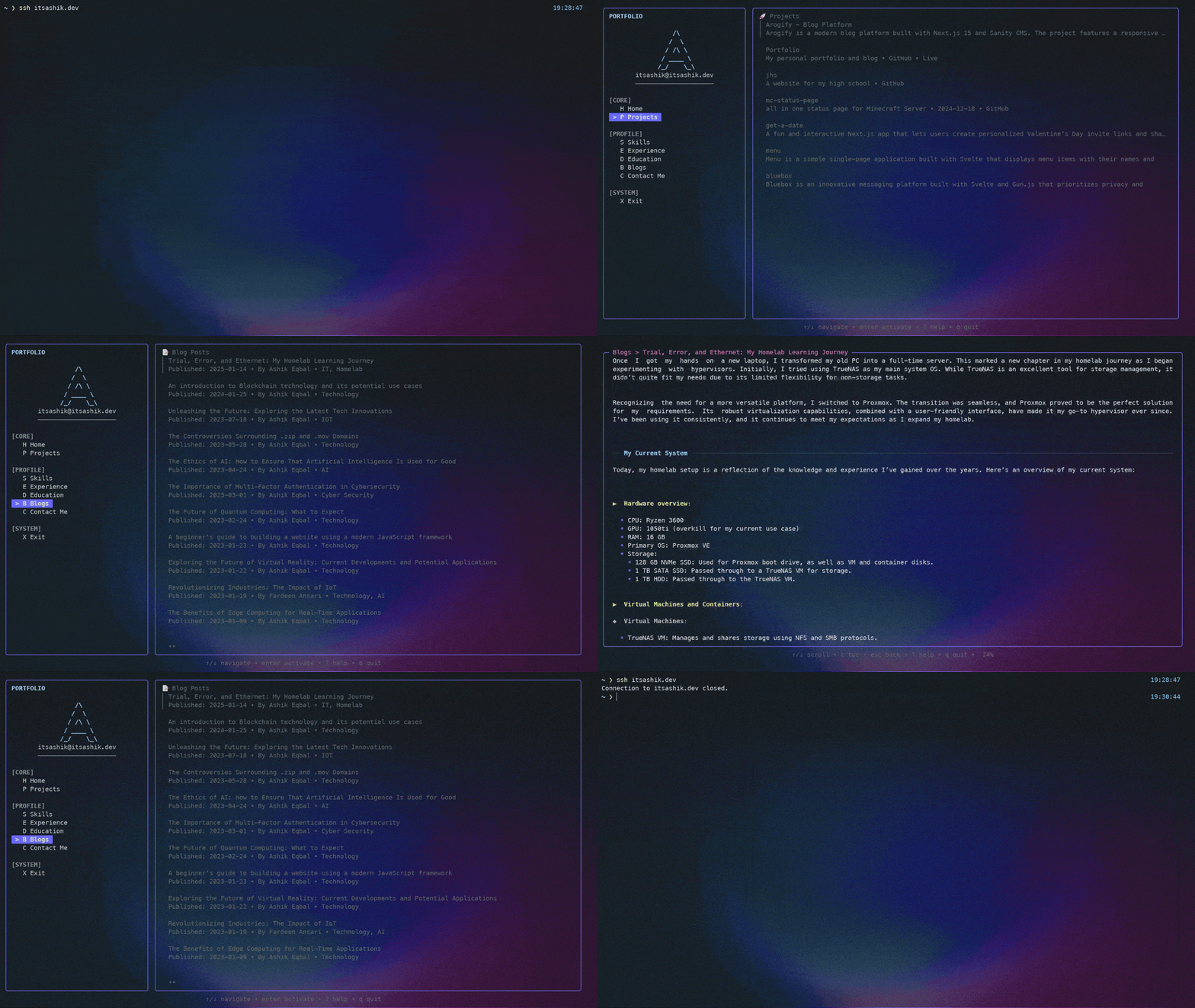
What it feels like
portfolio-tui opens with a short boot screen, then drops into a two-pane interface:
- A left sidebar for navigation
- A right content pane for Home, Projects, Skills, Experience, Education, Blogs, and Contact Me
- Detail views for projects and blog posts
- Searchable lists for projects and blogs
- A full-screen help overlay and a table of contents overlay for blog posts
The Home screen is styled like a neofetch-style profile card and highlights your bio, skills, featured projects, and latest posts.
Features
- Runs in two modes: local TUI and SSH server
- Personalized branding from
config.yaml - Sanity-backed content for projects, skills, posts, contact links, experience, and education
- Graceful fallback content when Sanity is unavailable
- Keyboard-first navigation with vim-style bindings
- Search/filter support for project and blog lists
- Blog detail pages with Portable Text rendering and
ttable of contents - Project detail pages with metadata, links, and technologies
- Mouse wheel support for scrollable views
- Docker and Docker Compose support for self-hosting
Quick Start
1. Clone and install dependencies
git clone https://github.com/MeAshikeqbal/portfolio-tui
cd portfolio-tui
go mod download
2. Create your config
cp config.example.yaml config.yamlThen edit config.yaml with your name, role, bio, social links, ASCII logo, and SSH defaults.
If you want an interactive setup flow, you can also run:
./setup-config.shMore config details live in CONFIG.md.
3. Optional: create .env
Sanity and SSH runtime settings are loaded from environment variables. There is no .env.example in the repo right now, so create .env manually if you want to override the defaults:
SANITY_PROJECT_ID=your_project_id
SANITY_DATASET=production
SANITY_API_VERSION=2024-12-21

PORTFOLIO_SSH_HOST=0.0.0.0
PORTFOLIO_SSH_PORT=23234
PORTFOLIO_SSH_KEY=.ssh/term_key
PORTFOLIO_BIND_IP=0.0.0.0
Notes:
config.yamlcontrols your profile, branding, and default SSH settings.envis mainly for Sanity access and runtime SSH overrides- if the SSH host key file does not exist, the app generates it automatically
4. Run locally
go run .Or build a binary:
go build -o portfolio-tui
./portfolio-tui
5. Run as an SSH portfolio
go run . serveOr with the built binary:
./portfolio-tui serveThen connect from another terminal:
ssh -p 23234 localhostNavigation
Main sections
The live menu in the app is:
HomeProjectsSkillsExperienceEducationBlogsContact MeExit
Keybindings
Global
?toggle helpqorCtrl+Cquit
Menu view
↑/kmove up↓/jmove downEnteropen the selected sectionH,P,S,E,D,B,C,Xjump directly to a menu item
Content views
Escgo backPgUp/bpage upPgDn/fpage downHome/gjump to topEnd/Gjump to bottom
List views
/filter projects or blog postsEnteropen the selected project or post
Blog detail
topen the table of contents overlay1-9jump to a heading while the TOC is open
Content and Customization
The app reads portfolio identity and branding from config.yaml, and fetches live content from Sanity for:
projectskillsaboutsocialLinkpostexperienceeducation
If Sanity is unavailable, the UI still boots and falls back to built-in placeholder content, which makes local development and demos much easier.
Docker
The container starts in SSH server mode by default. If you use the commands below as-is, create .env first or replace --env-file .env with explicit -e flags.
docker build -t portfolio-tui .

docker run --rm -p 0.0.0.0:23234:23234 \
  --env-file .env \
  -v "$(pwd)/config.yaml:/app/config.yaml:ro" \
  portfolio-tui
Connect with:
ssh -p 23234 localhostUseful variants:
# Persist generated SSH keys and logs
docker run --rm -p 23234:23234 \
  --env-file .env \
  -v "$(pwd)/config.yaml:/app/config.yaml:ro" \
  -v "$(pwd)/.ssh:/app/.ssh" \
  -v "$(pwd)/logs:/app/logs" \
  portfolio-tui

# Run local mode inside an interactive container
docker run --rm -it \
  --env-file .env \
  -v "$(pwd)/config.yaml:/app/config.yaml:ro" \
  portfolio-tui local
Docker Compose
compose.yaml runs the published GHCR image in SSH mode, mounts config.yaml, and stores SSH keys plus logs in Docker volumes. Compose also reads .env, so create that file before running these commands.
docker compose pull
docker compose up -d
docker compose logs -f
docker compose down
Useful environment values:
PORTFOLIO_IMAGE=ghcr.io/meashikeqbal/portfolio-tui:latest
PORTFOLIO_SSH_PORT=23234
PORTFOLIO_BIND_IP=0.0.0.0
To inspect or remove persistent data:
docker volume inspect portfolio-tui_portfolio_tui_ssh
docker volume inspect portfolio-tui_portfolio_tui_logs
docker compose down -v
Development
go fmt ./...
go build .
Stack
- Go
- Bubble Tea
- Bubbles
- Lip Gloss
- Wish
- Sanity CMS